This update has fixes to a number of issues.
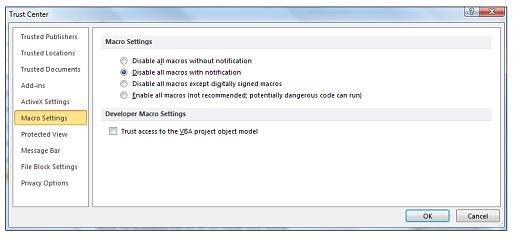
For the SMF Add-In to work in newer versions of Excel such as Office 365 you will need to change the default Trust Settings to allow macros to run.
Macro settings are located in the Trust Center. However, if your device is managed by your work or school the system administrator might prevent anyone from changing settings.
Important: When you change your macro settings in the Trust Center, they are changed only for the Microsoft 365 program that you are currently using. The macro settings are not changed for all your Microsoft 365 programs.
Click the File tab.
Click Options.
Click Trust Center, and then click Trust Center Settings.
In the Trust Center, click Macro Settings.
Make the selections that you want (Enable all macros), then click OK.
Here is the full article:
I have created an updated version of spreadsheet for the RCHGetElementNumber() function elements.
It is RCHGetElementNumber-Element-Definitions.xlsx
I will add it to the website.
I have also created new versions of the Template files as samples of which parts are working.
For now they are on my GitHub site and can be downloaded from: https://github.com/ClimberMel/SMF_Add-in/tree/main/samples
I will try to get the Templates page updated with link to the files there.
For RCHGetYahooHistory()
The parameters are as follows:
=RCHGetYahooHistory( Ticker, [Start Year], [Start Month], [Start Day], [End Year], [End Month], [End Day], [Period], [Data Items], [Header Line], [Adjust], [Resort] )
If you have this on your spreadsheet
You could use this array entered formula to get that values from the table
=RCHGetYahooHistory(C2,C3,C4,C5,C6,C7,C8,C9,C10,C11,C12,C13)
If the start and end dates are left black, the program uses default values and those may not be what you want. Currently the Start Date is 1970-1-1, but there is data for some companies older than that. I believe 1962 is the earliest data Yahoo has. 2020-12-31 is the end date for the last version of the Add-In, but that will be updated in the next release to 2024.
On Dec. 16, 2022 yahoo finance made changes to its web pages. This has caused a number of issues to the SMF Add-in, but it has also caused errors with yFinance python module.
The web site for the SMF Add-In
https://climbermel.github.io/SMF_Add-in/
The GitHub for code changes for SMF Add-In
https://github.com/ClimberMel/SMF_Add-in
The GitHub for yFinance
https://github.com/ranaroussi/yfinance
The PyPi install for yFinance
Zacks recently changed the web page name where the earnings estimates were located, so elements on smf-elements-8.txt needed to be updated.
New files on the website:This new release has fixes for: module smfGetOptionQuotes A member (Bruce) found the issue was with the crumb processing and provided cod...